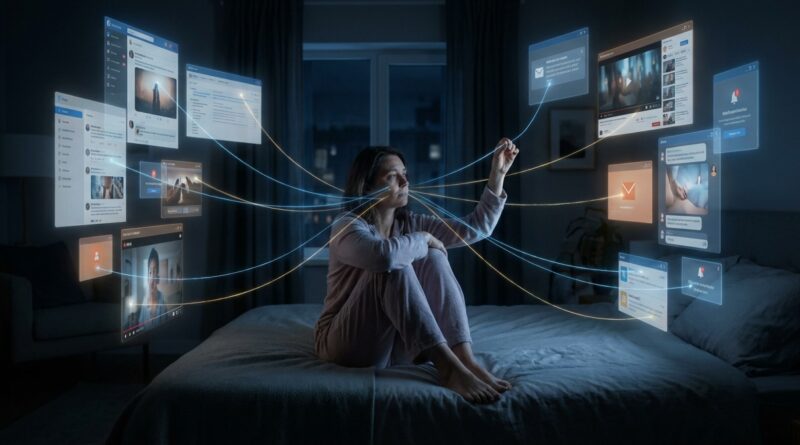
Why Your 5 Whys Keep Ignoring Digital Exhaustion: The Simple ‘Screen Why’ That Explains Why You Can’t Switch Off
You are not weak because you cannot put the phone down at 10:47 p.m. You are tired. There is a difference. A lot of people blame themselves for that strange evening state where they are too drained to work properly, too wired to rest, and somehow still opening one more tab, one more app, one more video. It feels irrational because it is not really about laziness or bad habits. It is often about digital exhaustion. Your brain is hunting for relief inside the same screens that helped wear it out in the first place. That loop is why ordinary advice like “just use more discipline” falls flat. If you want a better answer, borrow a classic problem-solving tool. Use 5 whys root cause analysis for digital burnout, then add one extra question. The Screen Why. It helps you spot not just what you are doing, but what the screen is doing to you.
⚡ In a Hurry? Key Takeaways
- Your late-night scrolling may be less about poor willpower and more about digital burnout mixed with app and device design that keeps you engaged.
- Use the 5 Whys, then add a “Screen Why” to ask how notifications, infinite feeds, open tabs, and work tools are shaping your behavior.
- You do not need a total digital detox. Small changes like moving one app, closing one loop, or creating one screen-free landing zone can win back real rest today.
Why the usual 5 Whys can miss the real problem
The classic 5 Whys method is simple. You start with a problem and ask why it happened. Then you keep asking why until you reach the root cause.
Example:
I cannot switch off at night.
Why? Because I keep checking my phone.
Why? Because I feel like I might miss something.
Why? Because work messages sometimes come in late.
Why? Because my team treats chat like an always-open office.
Why? Because there are no clear boundaries after hours.
That is useful. It shows a work culture problem.
But it still skips something important. It treats the phone like a neutral object. It is not. Your devices, apps, browser tabs, alerts, badges, auto-play clips, and “just checking” routines all push behavior in certain directions. If you leave that out, your root cause analysis for digital burnout stays incomplete.
The extra question that changes everything: The Screen Why
After each “why,” ask one more thing.
What about the screen made this easier to keep doing?
That is the Screen Why.
It sounds small, but it changes the whole diagnosis. Instead of blaming yourself alone, you start seeing the mix of fatigue, design, habit, and environment.
A quick example
Problem: I stayed up scrolling until 1 a.m.
Why? I was trying to unwind.
Screen Why? The app gave me endless low-effort content, so resting turned into consuming.
Why? I did not have the energy to read or sleep right away.
Screen Why? My phone was already in my hand from answering messages, so the jump into scrolling took one tap.
Why? I had unfinished work on my mind.
Screen Why? My laptop had six tabs open, my phone still showed Slack badges, and nothing signaled “the day is over.”
Why? I never got a clean stopping point.
Screen Why? My digital tools are built around continuous flow, not closure.
Now the issue looks very different. It is not “I lack discipline.” It is “I am mentally overloaded, and my devices are set up to catch me when I am weakest.” That is a much more honest answer.
What digital exhaustion actually feels like
Digital exhaustion is sneaky. It does not always look dramatic. Sometimes it looks like this:
- Replying to messages you do not care about because silence feels stressful.
- Keeping a laptop open after work “just in case.”
- Switching between news, email, shopping, group chats, and half-done tasks without wanting to.
- Feeling too tired for meaningful rest, but somehow not tired enough to stop consuming.
- Getting irritated by your phone while still reaching for it every few minutes.
This is why 5 whys root cause analysis for digital burnout matters. You are trying to find the actual engine of the problem, not just the most convenient person to blame, which is usually yourself.
How to run your own Screen Why in 10 minutes
1. Start with one annoying pattern
Pick one, not five.
Examples:
- I cannot stop checking work after dinner.
- I open social media without thinking.
- I keep “resting” with screens and feel worse after.
2. Ask the normal five whys
Write short answers. Do not aim for perfect insight. Aim for honesty.
3. After each answer, add the Screen Why
Ask:
- What on the screen kept this going?
- What feature lowered the friction?
- What visual cue pulled me back?
- What digital loose end made it hard to stop?
4. Circle what is emotional and what is mechanical
Emotional causes might be stress, loneliness, boredom, fear of missing out, or unfinished work anxiety.
Mechanical causes might be notifications, unread badges, auto-play, open tabs, charging your phone beside the bed, or having work apps on your personal device.
You usually need to address both.
The four most common Screen Whys
1. “I wanted relief, not content”
This is a big one. Many people are not looking for information at night. They are looking for a softer state of mind. Screens offer easy relief. No planning. No setup. No silence. Just instant stimulation.
The problem is that easy relief often turns into extended attention capture. You came for a breather. You got an hour of low-grade mental noise.
Micro-change: Create one easier off-screen relief option than scrolling. A blanket on the sofa. A printed magazine. A 10-minute playlist. Tea already on the counter. Rest has to be convenient or the phone wins.
2. “The device never told me I was done”
Digital life is full of open loops. There is always one more message, one more tab, one more update. Physical work often has natural stopping points. Digital work often does not.
Micro-change: Make your own closing ritual. Shut tabs. Write tomorrow’s first task on paper. Sign out of one work app. Put the laptop in a drawer or bag, not just to sleep on the desk.
3. “The design kept reducing friction”
This is the bit people underestimate. Infinite scroll, recommendation feeds, lock-screen previews, red badges, and auto-login all remove the little pauses where you might have chosen differently.
Micro-change: Add friction back. Log out of one sticky app. Turn off lock-screen previews. Move your most time-wasting app off the home screen. Disable auto-play. Tiny speed bumps matter.
4. “My brain now links screens with both work and recovery”
This is why it can feel impossible to switch off. The same device is your office, your entertainment center, your social life, your shopping mall, and your escape hatch. Your brain stops seeing it as a tool and starts seeing it as the place where everything happens.
Micro-change: Split functions where you can. Watch on one device, work on another. Keep one room or one chair for non-screen rest. Charge the phone outside arm’s reach if possible.
Why “just use willpower” usually fails
Willpower is real. It is just not reliable when you are already drained. By the evening, most people are not making fresh, noble decisions. They are falling toward the easiest available behavior.
If the easiest path is “pick up phone, get tiny hit of stimulation, repeat,” that is what will happen.
This is why good tech advice should be practical, not preachy. You do not need to become a monk. You need to make the healthier action slightly easier and the draining action slightly harder.
Small fixes that can give you back an hour today
Make one screen a worse escape hatch
Pick your main trap device and strip it down a little. Remove one app. Turn the screen grayscale. Disable non-human notifications like sales, recommendations, and “highlights.”
Make bedtime a destination, not a gap
Many people scroll because there is an awkward gap between “I should stop” and “I am ready to sleep.” Fill that gap on purpose. Shower. Stretch. Read two pages. Listen to one podcast segment with the screen facedown.
Close one digital loop before dinner
If your brain keeps buzzing with unfinished tasks, do a two-minute shutdown note before the evening starts. Write:
- What I finished
- What can wait
- What I will start first tomorrow
This reduces the urge to keep peeking back into work.
Separate boredom from burnout
Ask yourself, “Do I want stimulation, or do I want relief?” They are not the same. If you want stimulation, choose it on purpose. If you want relief, do not hand yourself a machine built to keep you alert.
When the root cause is not the phone at all
Sometimes the Screen Why reveals a bigger problem. Your device may be the delivery system, but not the root cause.
You might find:
- Your job rewards permanent availability.
- You are lonely, so the phone fills silence.
- You are anxious, so constant checking feels protective.
- You are overloaded, so numb scrolling feels like the only form of recovery you can access.
That matters. It means the goal is not simply to “cut screen time.” It is to deal with the reason screen time became your coping tool in the first place.
Use this simple Screen Why worksheet
Write this down exactly:
Problem: ____________________
Why 1: ____________________
Screen Why 1: ____________________
Why 2: ____________________
Screen Why 2: ____________________
Why 3: ____________________
Screen Why 3: ____________________
Why 4: ____________________
Screen Why 4: ____________________
Why 5: ____________________
Screen Why 5: ____________________
Then finish with:
- One emotional cause I need to respect
- One design factor I can change
- One tiny action I will test tonight
That last part is key. Not “change my life.” Just test one thing tonight.
At a Glance: Comparison
| Feature/Aspect | Details | Verdict |
|---|---|---|
| Standard 5 Whys | Good for finding habits, policies, and emotional triggers behind overuse. | Useful, but incomplete for screen-related problems. |
| 5 Whys plus Screen Why | Adds app design, notifications, open loops, and device setup to the analysis. | Best option for root cause analysis of digital burnout. |
| Pure willpower approach | Relies on self-control while tired, stressed, and surrounded by attention traps. | Usually fails, then makes you feel worse. |
Conclusion
You do not need a grand digital detox to feel better. You need a clearer explanation of what is happening. That is why the Screen Why matters. Everyone is talking about AI and productivity right now, but almost nobody is giving people a clean way to name the quiet psychological cost of being permanently online. Once you can see the pattern, you can change the pattern. A Screen Why gives you language, not guilt. It helps you understand why you stay tied to devices you resent, how design nudges keep you there, and what tiny changes can give back an hour of real rest or focus today. Start with one annoying habit tonight. Ask why five times. Then ask what the screen was doing at each step. You may find the problem is not that you are bad at switching off. It is that your tools are very, very good at keeping you on.