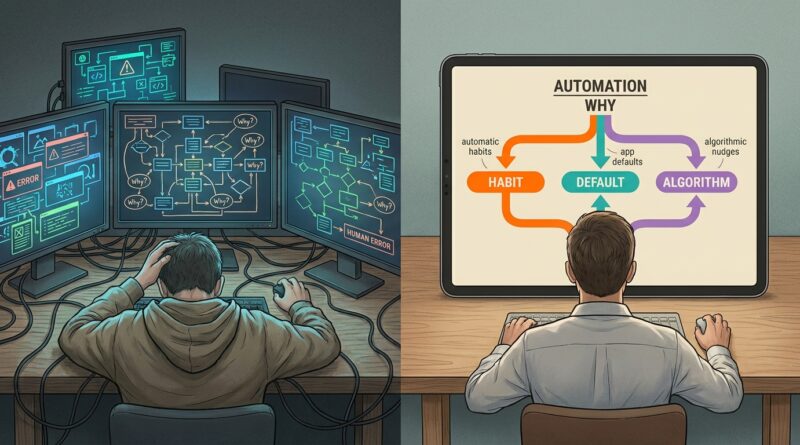
Why Your 5 Whys Keep Ignoring AI: The Simple ‘Automation Why’ That Exposes the Algorithm Behind Your Behavior
You fix the same problem again and again, and it starts to feel personal. Why do I keep doing this? Why does the team keep missing this step? Why does my budget, sleep, focus, or patience fall apart in the exact same way? That frustration is real, and most root cause advice does not help much. Traditional 5 Whys assumes a calm, rational human is making each choice on purpose. Real life is messier. Your phone pings. The app suggests. The software defaults. The workflow nudges. You click what is easiest because the system quietly made that path feel normal. That is why your usual root cause analysis can miss the real engine behind the behavior. You do not just need another “why.” You need one more question. Ask, “What automation, recommendation, default, or system script helped cause this?” That simple Automation Why can expose the hidden autopilot running your day, and give you one practical fix that actually sticks.
⚡ In a Hurry? Key Takeaways
- The automation why root cause analysis framework adds one missing question: what tool, default, algorithm, or notification shaped this behavior?
- Start small by removing one trigger today, like turning off a notification, changing a default setting, or adding a pause before auto-suggested choices.
- This is not about blaming AI for everything. It is about seeing when your environment is steering decisions so you can design better habits and systems.
Why the usual 5 Whys often misses the real problem
The 5 Whys is useful because it pushes you past surface-level answers. But it has a blind spot. It often treats people like they are fully in charge of every move.
That is not how modern life works.
Maybe you ordered takeout again because you were tired. Fair enough. But why were you on a food app in the first place? Because a push notification hit at 5:42 p.m. with a discount. Maybe your team skipped an approval step because they were careless. Or maybe the project tool auto-assigned the task and buried the warning under three tabs. Maybe you spent too much money because of impulse control. Or maybe your shopping app sent “only 2 left” alerts all week and stored your card by default.
The old method asks, “Why did you choose that?” The better question is sometimes, “What quietly chose with you?”
What the Automation Why actually is
The Automation Why is a simple extra question you add during root cause analysis:
Ask this
What automation, recommendation, default, workflow rule, or digital trigger influenced this outcome?
That is it. No jargon. No giant framework diagram needed.
You can tack it onto a normal 5 Whys session, or use it on your own when you notice a repeating pattern.
What counts as “automation” here?
More than people think.
- Notifications and reminders
- Autoplay and endless feeds
- Recommended products, videos, or messages
- Calendar defaults and meeting templates
- Saved payment methods and one-click checkout
- Workflow software that routes tasks a certain way
- AI writing tools that suggest tone, wording, or replies
- GPS routes that send everyone to the same crowded road
- Health app streaks that push behavior
- Smart home routines that shape your schedule
These tools are not evil. Most are genuinely helpful. The problem is that they influence behavior whether you notice them or not.
The hidden script behind repeated behavior
A lot of “bad habits” are really well-designed loops.
You think, “I keep getting distracted.” But maybe your laptop opens six work apps on startup, your phone lights up every few minutes, and your browser starts on a news feed. That is not just distraction. That is a system handing your attention to the loudest thing in the room.
You think, “Our team keeps creating duplicate work.” But maybe your project platform auto-creates tasks from multiple templates, and nobody knows which board is the real source. Again, not just a people problem. It is a design problem.
This matters because if the cause is partly environmental, then the fix should be environmental too.
That is a relief, frankly. It means you may not be failing because you lack discipline. You may be working inside a setup that keeps pulling you off course.
How to use the automation why root cause analysis framework
Here is the dead-simple version.
Step 1: Name the recurring problem
Be specific.
Not “I am bad with money.” Try “I keep making late-night impulse purchases on my phone.”
Not “Our handoffs are messy.” Try “Customer requests keep getting dropped between chat and ticketing.”
Step 2: Run your normal whys
Ask why a few times as usual.
Example:
- Why did I buy things I did not need? Because I was browsing in bed.
- Why was I browsing in bed? Because I was winding down with my phone.
- Why was I on shopping apps instead of reading? Because they were the first apps I opened.
Step 3: Insert the Automation Why
Now ask:
What automation or default helped this happen?
Answer:
- A sale alert arrived at night
- The app showed personalized recommendations
- My card was already saved
- The app icon was on my home screen
Step 4: Change one part of the system
Do not redesign your entire life.
Pick one friction point or one trigger.
- Turn off sale notifications
- Move the app off your home screen
- Remove saved payment details
- Set a bedtime focus mode
That is a better fix than promising to “have more willpower.”
A real-world example from work
Let us say a manager keeps saying, “My team never updates the CRM.”
A standard 5 Whys session might end up here:
- Why is the CRM incomplete? Because reps forget to update it.
- Why do they forget? Because they are busy after calls.
- Why are they busy? Because they jump straight to the next task.
All true. But still incomplete.
Now add the Automation Why:
What in the system makes skipping updates more likely?
- The dialer auto-loads the next call immediately
- The CRM form requires too many fields
- There is no reminder until the end of the day
- The mobile version is clunky, so reps avoid it
Now the root cause is clearer. The workflow software is rewarding speed and punishing documentation.
The better fix is not another lecture. It is changing the sequence, simplifying fields, or creating a required pause between calls.
This also shows up in health, money, and relationships
Health
You keep missing workouts.
Automation Why: your streaming app auto-plays late at night, your alarm is easy to dismiss, and your fitness class booking app sends reminders too late to help.
Money
You keep overspending.
Automation Why: personalized deals, one-click checkout, saved cards, and “buy again” prompts are doing part of the deciding for you.
Relationships
You keep having shallow, distracted conversations at home.
Automation Why: read receipts, message previews, buzzing group chats, and algorithmic feeds keep interrupting attention every few minutes.
Once you see the script, the shame starts to loosen. Good. Shame rarely fixes systems.
Why AI makes this more important now
AI is not only chatbots and image tools. It is also ranking, sorting, suggesting, prioritizing, nudging, and predicting.
That means AI now sits inside everyday choices:
- Which email appears most urgent
- Which task gets surfaced first
- Which video keeps you watching
- Which product seems tempting
- Which route looks fastest
- Which reply sounds easiest to send
None of that removes your responsibility. But it does change the map of responsibility. If a recommendation engine is steering your attention all day, then any honest root cause analysis should include it.
Otherwise, we keep telling people to be stronger while leaving the machine that keeps poking them fully intact.
How the Automation Why works with the Timeline Why
Sometimes the hidden automation is not just influencing you now. It started shaping the problem long ago.
That is where time matters too. If you want to know when the real root cause first got planted, this companion idea helps: Why Your 5 Whys Keep Ignoring Time: The Simple ‘Timeline Why’ That Reveals When the Real Root Cause Was Born.
Together, these two questions are powerful:
- What system or automation shaped the behavior?
- When did that pattern begin?
That combination is often what turns a vague frustration into a fixable problem.
Common mistakes people make with this framework
1. Blaming the tool for everything
Yes, systems influence behavior. No, they are not the whole story.
The point is balance. You still own your choices. You just stop pretending choices happen in a vacuum.
2. Trying to fix ten triggers at once
Do not do a full digital detox because you got one bad shopping alert.
Make one surgical change first. Small changes are easier to keep.
3. Focusing only on personal apps
Work tools matter just as much. Many repeating office problems are really hidden defaults in software, not bad attitudes.
4. Treating convenience as neutral
Convenience is powerful. If one path is frictionless and another is annoying, most people will pick the easy one. That is not laziness. That is normal human behavior.
One quick worksheet you can use today
If you want a fast version, use this:
- Problem: What keeps happening?
- Immediate reason: What did I or others do?
- Automation Why: What alert, default, recommendation, or workflow rule made that easier or more likely?
- Trigger point: Where exactly did the system nudge the behavior?
- One change: What single setting, sequence, or default can I change this week?
That is the whole framework in plain English.
Examples of one concrete change that actually sticks
Here are practical fixes that beat motivational speeches:
- Turn off non-human notifications after 6 p.m.
- Remove one-click buying for stores that tempt you
- Set messaging apps to manual refresh during focus blocks
- Make your notes app open before social apps on your phone
- Change team software so required fields appear before handoff
- Disable autoplay on services that steal bedtime
- Create a five-minute pause before AI-generated replies are sent to clients
- Use grayscale or hide tempting apps during certain hours
None of these are dramatic. That is the point. Good root cause fixes often feel boring. Boring is reliable.
At a Glance: Comparison
| Feature/Aspect | Details | Verdict |
|---|---|---|
| Traditional 5 Whys | Good for tracing human actions and process gaps, but often assumes every decision was fully conscious. | Useful, but incomplete in app-driven and AI-shaped environments. |
| Automation Why | Adds a check for defaults, notifications, AI recommendations, saved settings, and workflow design that steer behavior. | Best upgrade for modern root cause analysis. |
| Best first fix | Change one trigger or default, not your whole personality. Remove friction from the good path and add friction to the risky one. | Most likely to stick in real life. |
Conclusion
Most of us are not making every decision from a blank slate. AI, recommendation engines, workflow tools, saved settings, and little digital nudges are involved far more often than we admit. That is why the automation why root cause analysis framework matters. It gives you a plain, practical way to spot the hidden script instead of blaming yourself or your team for lacking willpower. Once you ask what system helped cause the behavior, you can make one concrete change today, like turning off a trigger, slowing down a default, or redesigning the path of least resistance. That is often enough to break the loop. You do not need perfect control. You just need to notice who else has a hand on the steering wheel, then take one piece of it back.